MagickVoice Help Center — Phone Menus
Phone menus
Manage IVR workflows — automated call flows that greet callers, offer press-a-key menus, collect input, route the call, or hand it off to an AI assistant — and open the visual builder to create or change one.
Audience: IVR builders · Page address: /app/ivr-workflows · Your admin may need to enable this feature
Common tasks
- Create a workflow from a template
- Import a workflow
- Edit an existing workflow
- Export or delete a workflow
How to use this page
1. Manage your phone menu workflows
Keep IVR call flows organized and ready to attach to live calling.
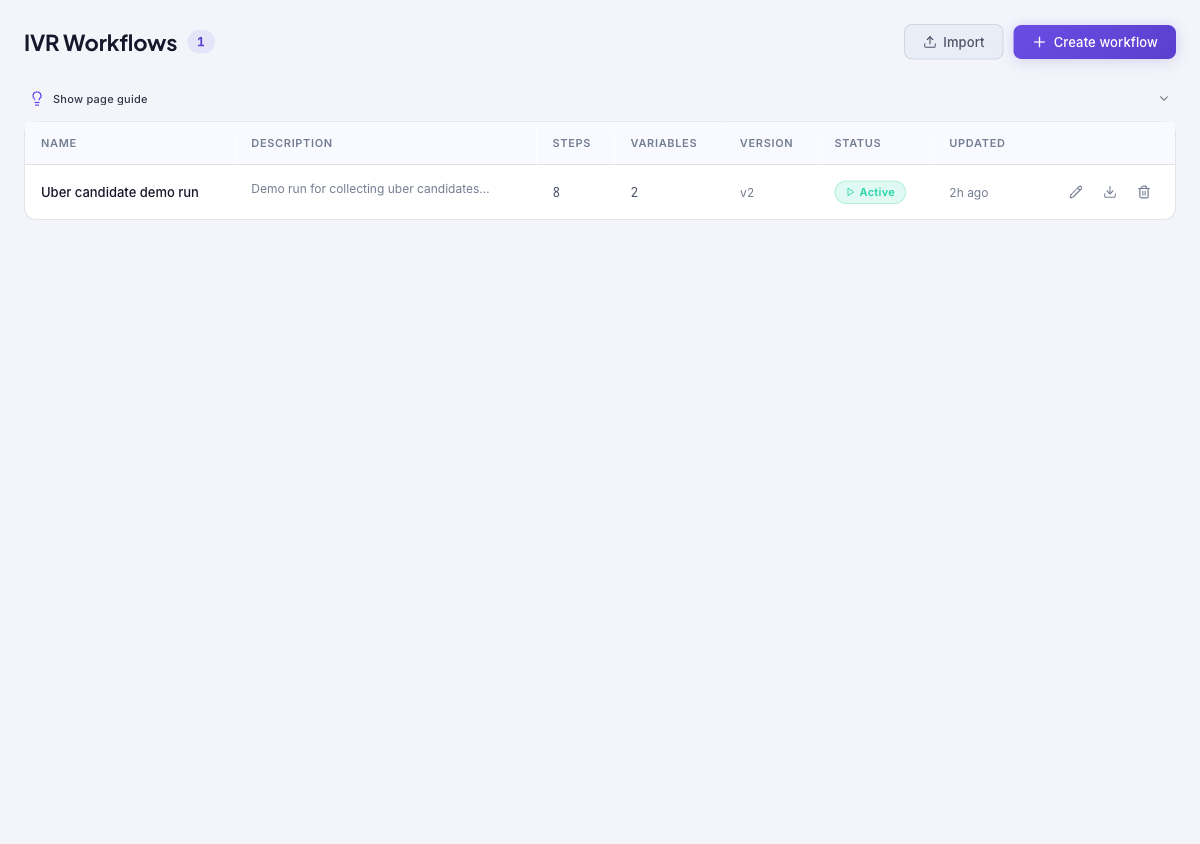
- Open Phone Menus. The count beside the heading shows how many workflows exist; the table lists each workflow with its description, step count, variable count, version, status (for example Active), and when it was last updated.
- Select Create workflow to start from a ready-made template or a blank canvas. Select Edit on a row to open the same builder for that workflow.
- Use Import only with a workflow file you have reviewed, and Export on a row to save a workflow definition for transfer or backup.
- Use Delete on a row only when the workflow is no longer needed. Confirm it is not attached to a live number or campaign before removing it.
Tips and troubleshooting
- Use short labels for IVR steps so the canvas remains readable as the menu grows.
- Test no-input and invalid-input paths; they are the most common places callers get stuck.
- The page guide explains that each workflow is a sequence of steps — play audio, gather input, make a decision, call a webhook, or hand off to an AI assistant.
- Test a workflow before going live by launching a small batch from the Campaign Composer, then review the run on Menu Activity.